|
|
| (One intermediate revision by the same user not shown) |
| Line 8: |
Line 8: |
|
| |
|
| Lists also have an internal and external link allowing you to navigate into that record in the task pane or in CRM. | | Lists also have an internal and external link allowing you to navigate into that record in the task pane or in CRM. |
|
| |
| -----
| |
| Customizing
| |
|
| |
| A. List fields are controlled by the screens "ENTITYOfficeintSmall" in CRM. The number of columns displayed is controlled at the user level in their local settings (List Column Count). PLEASE NOTE: Fields under the carat that have no value will not display.
| |
|
| |
| The first column is the default SORT field. Clicking on the column will also apply a sort based on that column.
| |
|
| |
| B. Tabs are controlled via CRM using the tab group called "ENTITYint"
| |
|
| |
| [[File:tabs4.jpg]]
| |
|
| |
| Caption: Locations
| |
| Action: customfile
| |
| Custom File: sagecrmws/ac2020/companylocations.asp
| |
|
| |
|
| |
| -----
| |
| Custom Entities in Lists
| |
|
| |
| You can add in custom entities in tab under company for example.
| |
|
| |
| [[File:equipmentlist.png]]
| |
|
| |
| In our example we create an entity called "Equipment" (created using the Entity Wizard in Sage CRM)
| |
|
| |
| In our tab we set this up as follows
| |
|
| |
| Caption: Equipement
| |
| Custom File: list_Equipment
| |
| SQL: equi_companyid
| |
|
| |
| 1. Custom File:
| |
| The value in this is in the format "list_ENTITY"
| |
|
| |
| 2. SQL:
| |
| The value in this is the field that links the context. So we have this tab in tabgroup "companyint" and so we set the companyid.
| |
Latest revision as of 09:28, 29 June 2026
The tabs we are referring to here are against the Entity
EG
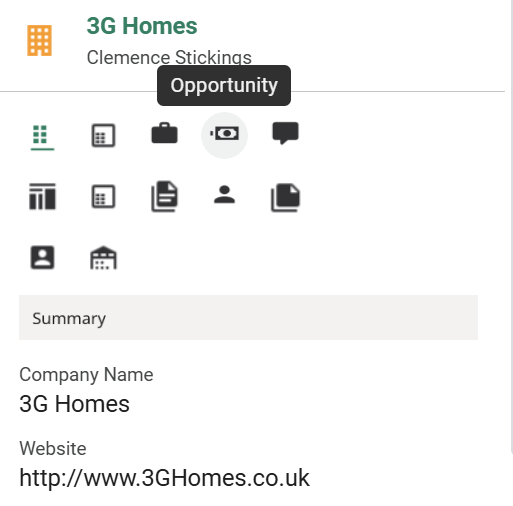
Hovering over the tabs tells you what is behind it.
Lists also have an internal and external link allowing you to navigate into that record in the task pane or in CRM.


